Browser extension
Prepare every application on the job's own page
Ruubu for Chrome works on the job sites you already use. See which jobs fit while you browse, close the gaps the job asks for, get a resume and cover letter written for that job and fill the application form from your resume. You check every answer and press Submit yourself.
Free to install. Badges on job lists are worked out on your device and from your tracker, and Ruubu never submits an application for you.
How it works
Add Ruubu to Chrome
Install the extension, then click Connect on ruubu.com while you are signed in. The extension never sees your password.
Open a job posting
On LinkedIn, Indeed, Greenhouse, Lever, Workday and the other supported sites a small Ruubu button appears. Anywhere else, click the Ruubu icon in the toolbar.
Save, prepare, apply
Save the job to your tracker, close its gaps, let Ruubu write the resume and cover letter for it, then fill the form. Ruubu offers to mark it as applied after you submit.
What it does
Badges on job lists
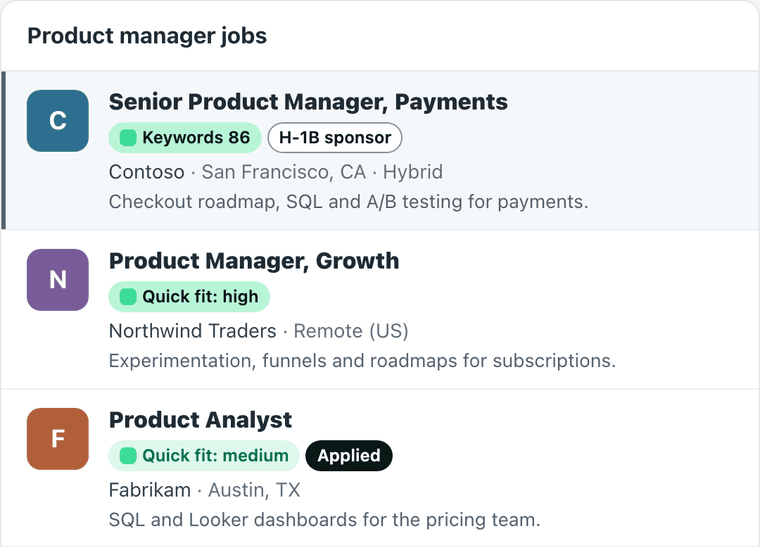
On LinkedIn, Indeed, Glassdoor, StepStone, XING and Kariyer.net results, each card shows a Quick fit estimate, whether the employer files H-1B visas (US jobs, US Department of Labor data) and whether the job is already in your tracker. Worked out on your device and from your tracker; you can turn badges off per site.
Your keyword coverage for this job
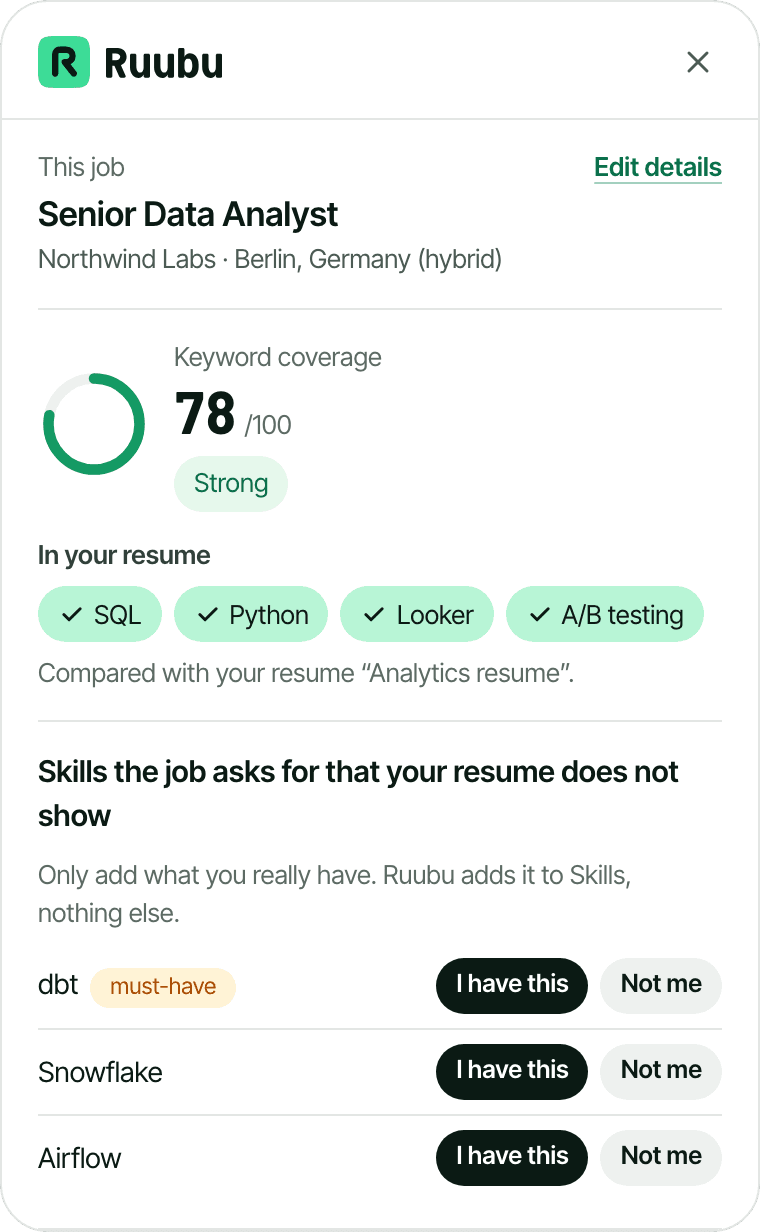
Open a job and the same score as the Job Link Optimizer appears: the skills it asks for, which ones your resume shows and which are missing, for the resume you choose.
Gap checklist
For each skill the job asks for that your resume does not show, choose “I have this” to add it to your Skills, or “Not me” to hide it. With Resume Pass or Pro, Ruubu can also show the skill in one of your roles, for you to accept.
A resume for this job
With Pro, one click writes a version of your resume for the job from your real experience, and the form can attach it as the PDF.
Cover letter in the panel
With Resume Pass or Pro, Ruubu writes the cover letter for the job, you edit it in the panel and insert it into the form's cover letter field.
Answer drafts for open questions
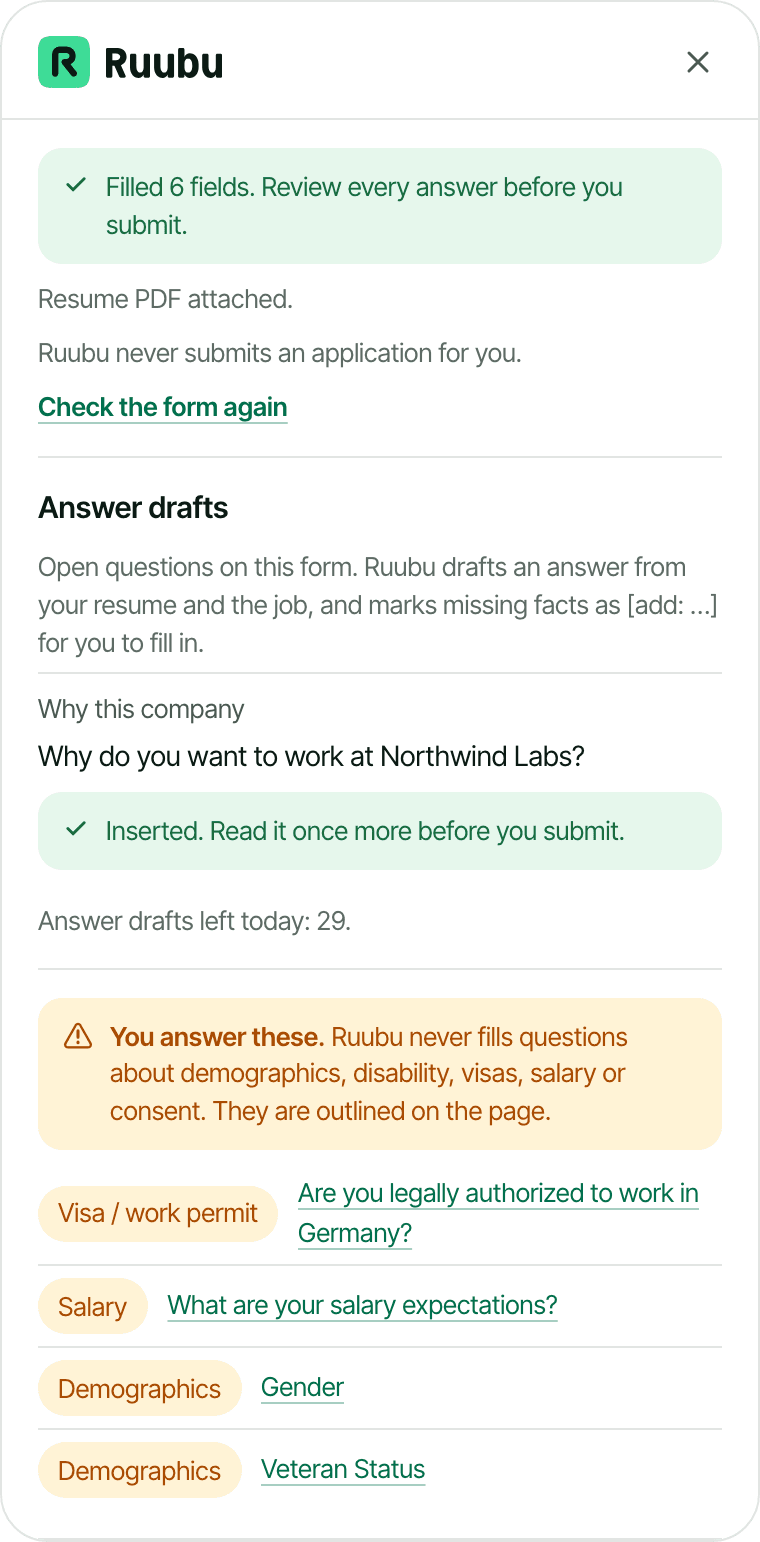
For questions such as “Why do you want to work here?” or “Tell us about yourself”, Ruubu drafts an answer from your resume and the job, in the job's language, and marks missing facts as [add: …] for you to fill in. Resume Pass and Pro.
Autofill on 14 application systems
Fills your name, email, phone, location, links, work history and education and attaches your resume PDF on Greenhouse, Lever, Workday, Ashby, SmartRecruiters, iCIMS, Taleo, SAP SuccessFactors, Jobvite, BambooHR, Workable, Recruitee, Personio and Teamtailor. You see a preview first.
Applications tracked for you
After you submit, Ruubu notices the confirmation page (LinkedIn Easy Apply too) and offers to mark the job as applied, with the date, the resume and the cover letter you used. On LinkedIn's My Jobs page you can import your Saved and Applied jobs after a preview, and the extension reminds you to follow up when an application has had no answer for a week. Saved jobs: up to 25 on the free plan, no limit on Resume Pass and Pro.
People to ask for a referral
LinkedIn searches for people in the role, recruiters and alumni of your school at that company, plus a short message draft. You open them in your own LinkedIn account; Ruubu does not look anyone up.
LinkedIn profile sync
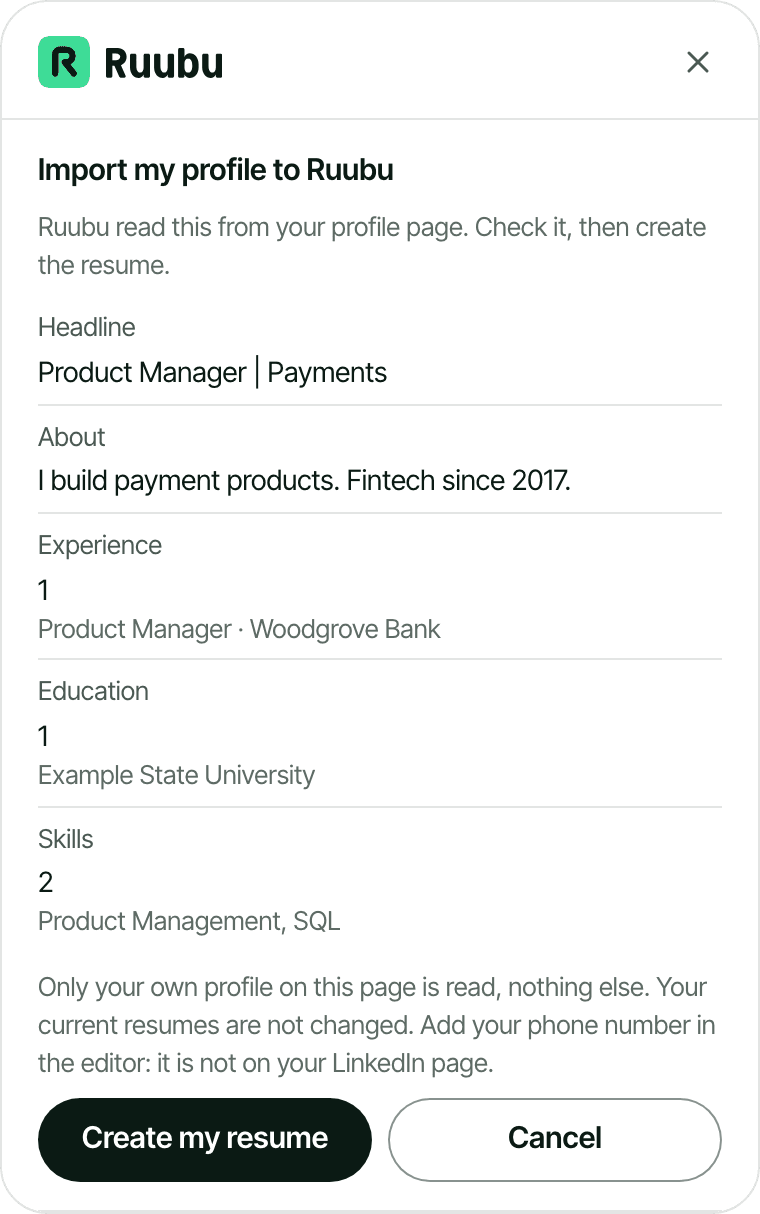
On your own LinkedIn profile, compare it with your resume section by section: import it as a new Ruubu resume, pull single items into your resume, or fill LinkedIn's own edit dialogs from your resume. You click Save on LinkedIn; Ruubu never saves or changes anything by itself and never copies your phone, email or address. Profile suggestions and AI rewrites need Resume Pass or Pro.
Ask Ruubu next to the job
Ask about the job you are looking at: what to stress, how to prepare, who could refer you. The same Ask Ruubu as on ruubu.com, with its daily messages per plan.
Sensitive questions stay yours
Ruubu never answers questions about gender, race, veteran status, disability, visas or work permits, salary, date of birth or consent. It outlines them on the page so you answer them yourself.
On result lists and on your LinkedIn profile
What each plan includes
The extension is free to install. Limits reset every day at midnight (UTC) and can change; the pricing page has the current plans.
| In the extension | Free | Resume Pass | Pro |
|---|---|---|---|
| Badges on job lists, H-1B and tracker | Included | Included | Included |
| New job analyses per day (a job someone already analysed is free) | 15 | 60 | 200 |
| Saved jobs in the tracker | 25 | No limit | No limit |
| Autofill and resume PDF | Included (PDF with a small Ruubu mark) | Included | Included |
| Gap checklist: add to Skills | Included | Included | Included |
| LinkedIn profile sync and import | Included | Included | Included |
| Show an added skill in a role | Not included | Included | Included |
| Cover letters | Not included | Monthly allowance of your plan | Monthly allowance of your plan |
| Answer drafts per day | Not included | 20 | 50 |
| LinkedIn profile suggestions per day | Not included | 1 | 2 |
| A tailored resume for each job | Not included | Not included | Monthly allowance of your plan |
Where it works
The Ruubu button appears on job postings and application forms on these sites. On any other site, click the toolbar icon: Ruubu reads job postings that publish structured job data, or the text you select.
Job boards
- LinkedIn Jobs
- Indeed
- Glassdoor
- StepStone
- Welcome to the Jungle
- Kariyer.net
Application systems: job pages and forms
- Greenhouse
- Lever
- Workday
- Ashby
- SmartRecruiters
- iCIMS
- Taleo
- SAP SuccessFactors
- Jobvite
- BambooHR
- Workable
- Recruitee
- Personio
- Teamtailor
What the extension can see
- It reads a page only on the sites listed above, or on a tab where you clicked the Ruubu icon or pressed its shortcut. There it looks for a job posting, job cards on a result list, an application form or your own LinkedIn profile, and nothing else.
- For list badges it sends only each card's company, location and link, to look up H-1B filings and your tracker. The full job text goes to Ruubu only when you open a job, save, score or tailor it. What you type into forms is never sent: autofill happens in your browser.
- AI runs only when you click: writing a letter, an answer draft, a resume or profile suggestions. Each job is analysed once and the result is reused for everyone, so browsing lists never runs AI.
- It never sees your password. Clicking Connect on ruubu.com gives it a token that can save jobs, score them, read your resume for autofill and write with Ruubu for you. The token expires, and you can disconnect at any time.
- Ruubu does not sell your data or use it for advertising.
- The details are in our privacy policy.
Permissions it asks for
- Access to the listed job sites: shows the Ruubu button on their job postings and application forms.
- Active tab: lets you use Ruubu on a page of another site, only after you click the Ruubu icon there.
- Scripting: adds the Ruubu panel to that tab after your click.
- Storage: keeps your connection token and your chosen resume on this computer.
- Keyboard shortcut (Alt+R): opens the panel on the page you are on. It needs no extra permission and you can change it in Chrome.
Questions about Ruubu for Chrome
Does Ruubu submit applications for me?
No. Ruubu fills the fields you choose and stops there. You read the form, answer the questions it leaves for you and press Submit yourself.
Does it scrape LinkedIn or other job boards?
No. It reads the job posting you have open in your own browser, the same text you see, and only when you use it. Ruubu's servers never fetch LinkedIn pages for the extension.
Does Ruubu use AI on every page I visit?
No. Badges on job lists are worked out on your device and from our database, without AI. A job is analysed once when someone opens it, and that analysis is reused. AI writing only runs when you click a button, within your plan's daily limits.
What does it cost?
The extension is free. Badges, match scores, the gap checklist, autofill, saving jobs (up to 25 on the free plan) and the LinkedIn import work on every plan; on the free plan the attached PDF carries a small Ruubu mark. Cover letters, answer drafts and profile suggestions need Resume Pass or Pro; a tailored resume for each job needs Pro.
Does it work on other job sites?
On any page that publishes structured job data, as many company career sites do, click the Ruubu icon. If Ruubu finds nothing, select the job description text first and click the icon again.
Which browsers does it work in?
Google Chrome, and Chromium browsers that install extensions from the Chrome Web Store, such as Microsoft Edge and Brave.
How do I disconnect it?
Click Disconnect in the extension, or disconnect every browser on the connect page. Removing the extension from Chrome also deletes its token.
Related
Prepare every application for its job
Save the posting, see the gaps, tailor your resume and fill the form, starting from the page you are on.